My Google AI Ultra plan includes an NVIDIA GPU I can start from my Linux server by the minute. On 24 November 2026, my agents ran subtitles, voice cloning, product images, NVENC video encoding, screenshot OCR, and 3,000 SEO embeddings on it. Here is the exact CLI setup, every measured unit rate, and the five places where Colab falls short.
Companion guide for the YouTube video "My Google AI Ultra plan came with a GPU" (scheduled Sunday 29 November 2026, 17:00 CET). Official Colab announcement dated 22 September 2026; CLI setup, balance, hourly rates, and all six jobs measured live on 24 November 2026.
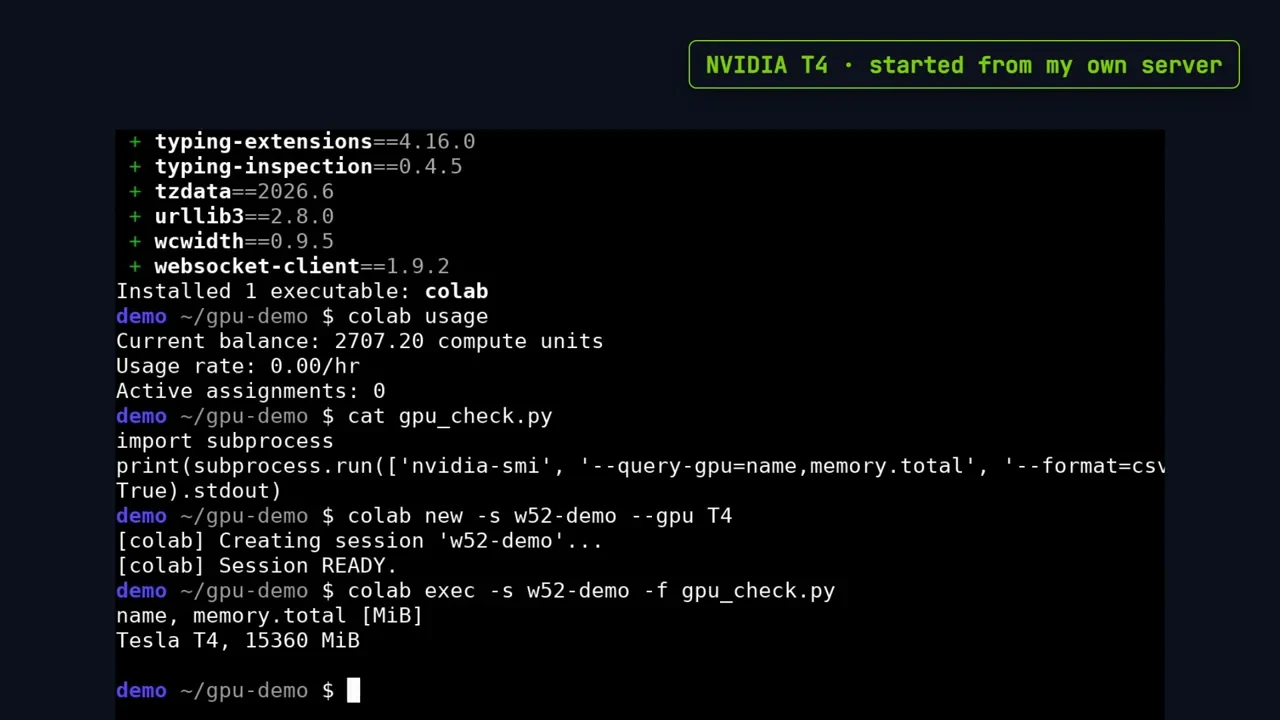
colab usage, colab new -s w52-demo --gpu T4, and colab exec returning an NVIDIA Tesla T4 with 15,360 MiB VRAM.Full 6-minute walkthrough with the live terminal install, the real L4 Service Unavailable fallback to T4, the Dutch voice clone sample, and all six GPU jobs running end to end.

Since 22 September 2026, Google Colab is included in Google AI plans (Google Developers Blog). Colab is Google's notebook platform with NVIDIA GPUs behind it, and your plan puts compute units on your Colab account as the currency for GPU time.
colab usage on 24 November 2026 at 17:35 CET.colab usage, 24 November 2026, 17:35 CET).colab usage, 24 November 2026, 18:11 CET).Do not read 2,707.9 units as a published monthly grant. Google's 22 September 2026 announcement confirms that Colab is included in Google AI plans without promising a fixed monthly unit number, so treat 2,707.9 as one real balance measured on my account on 24 November 2026.
When a machine is running, colab usage reports the live burn rate per hour. Running one L4 and one T4 at the same time at 17:48 CET reported 3.57 units/hr, matching the sum of the two single-card readings (2.33 + 1.24).
Google publishes an official open-source command line tool under the googlecolab GitHub organization: googlecolab/google-colab-cli (version 0.8.0, Apache-2.0 license, verified with a fresh install on 24 November 2026). No API key and no separate billing console are needed.
On a laptop with a desktop keyring, install the tool directly with uv. On a headless Linux server without a desktop keyring, add --with keyrings.alt so your OAuth login survives after the terminal closes.
uv tool install google-colab-cliuv tool install google-colab-cli --with keyrings.altThe first command opens a browser login flow for the Google account that holds your plan. Once signed in, colab usage prints your remaining compute units, current burn rate, and active assignments.
colab usageCreate a tiny script that asks nvidia-smi for the card name and VRAM, spin up a session, and execute the script remotely. I default to --gpu L4 for heavier models, but during the 24 November recording L4 returned Service Unavailable, so this verified run used --gpu T4.
import subprocess
out = subprocess.run(
["nvidia-smi", "--query-gpu=name,memory.total", "--format=csv"],
capture_output=True,
text=True,
).stdout
print(out)colab new -s w52-demo --gpu T4
colab exec -s w52-demo -f gpu_check.pyOutput on the T4 session recorded 24 November 2026: Tesla T4, 15360 MiB.
People forget this step. An idle Colab runtime keeps burning compute units until you stop it or Colab reclaims it.
colab stop -s w52-demoTyping colab new, uploading files, running Python, downloading results, and calling colab stop gets old fast. I wrapped the official CLI in one small tool called colab-gpu. One command handles one job, and a finally block stops the machine even if the model crashes mid-run.
Claude Code, Codex, and Antigravity all run on the same server and read the same rules file. If you already saw how I split coding work across Gemini 4 Neon inside Antigravity CLI and keep Claude Code sessions inside their weekly limit, this follows the same pattern: the GPU becomes one more CLI tool any agent can call without burning local CPU.
Start an L4 or T4 runtime, or attach to an existing named session for a batch.
Copy the audio, image, clip, or JSON payload onto the remote Colab machine.
Run Whisper, Chatterbox, RealVisXL, FFmpeg NVENC, Qwen2.5-VL, or e5-large on GPU.
Pull results back to the server and strip AI metadata from generated images and video.
Call colab stop automatically on success or error so units do not leak.
For a multi-job batch, pass the same session name (-s w52-jobs) so every job reuses one warm VM instead of paying the cold-start penalty each time, then stop the session once the batch finishes:
colab-gpu whisper -i sam_nl.wav -o subs.json --srt subs.srt --gpu T4 -s w52-jobs
colab-gpu upscale -i mug_small.png -o mug_4x.png --scale 4 --remove-bg -s w52-jobs
colab-gpu nvenc -i raw.mp4 -o reel.mp4 --width 720 --height 1280 --fps 30 -s w52-jobs
colab stop -s w52-jobsPairing deterministic wrappers with a Claude Code Stop hook keeps agents from stopping halfway through a multi-step media batch.
Every number below comes from real runs on 24 November 2026 on my own Colab sessions. Wall-clock times include cold VM startup and model downloads unless noted otherwise, because that is the wait you actually feel on a single job.
| Job | Model / encoder | Input & output | Measured time | GPU & note |
|---|---|---|---|---|
| 1. Subtitles | openai/whisper-large-v3 |
21.4 s Dutch audio → 72 words, 12 segments + .srt |
82.4 s | T4 (incl. VM start). Earlier L4 run: 27.6 s → 53 words in 62.4 s. |
| 2. Voice clone | ChatterboxMultilingualTTS |
12.0 s Dutch ref → 6.04 s cloned WAV (zero-shot) | 112.4 s | T4 (earlier L4 run: 8.2 s output in 83.7 s). Close match, mispronounced "GPU". |
| 3a. Product photo | RealVisXL V5.0 |
Text prompt → 1024×640 product shot | 43.8 s | L4. Entire job incl. VM start + download cost 0.16 units. |
| 3b. 4× upscale + cutout | RealESRGAN_x4plus + rembg |
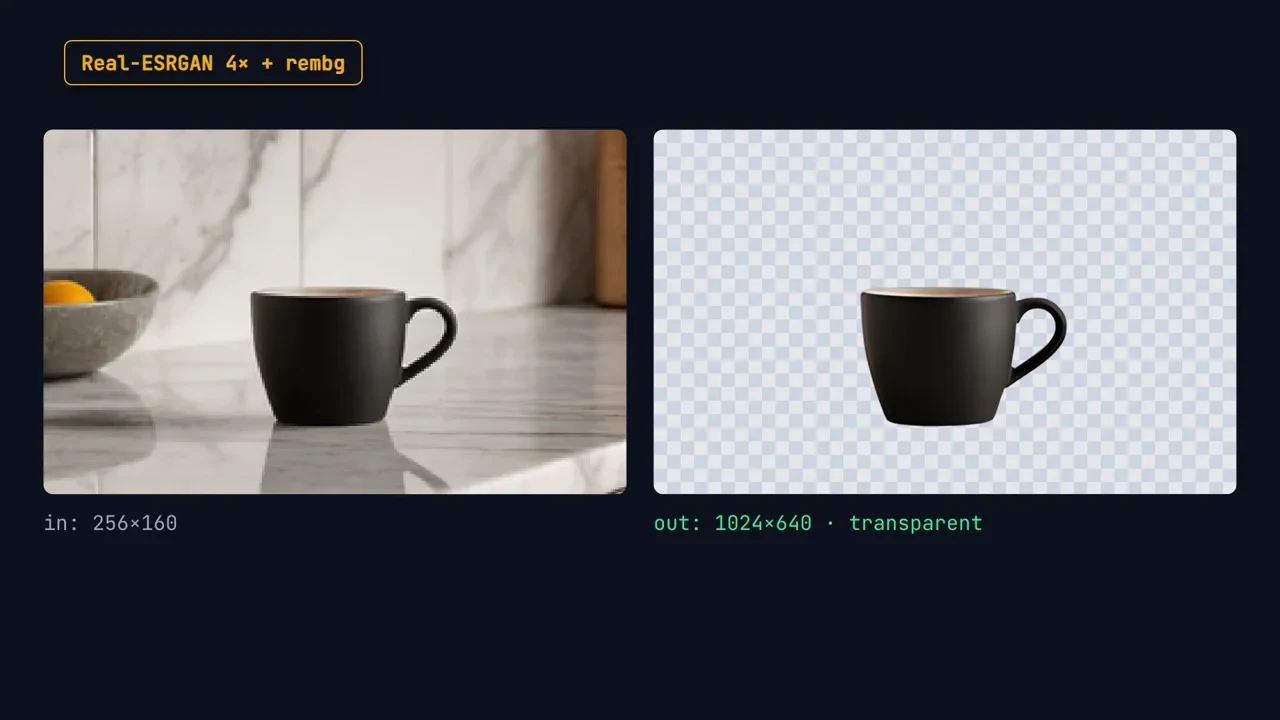
256×160 → 1024×640 RGBA transparent PNG | 114.0 s | T4 (initial L4 cold run took 148 s). Clean edge inside cup handle. |
| 4. Video encode | FFmpeg NVIDIA NVENC | 5.0 s clip encoded to H.264 | 1.27 s | T4 (3.93× real time). On L4: 5.04 s (4.69→3.2 MB) in 0.99 s (5.09×). |
| 5. Screenshot OCR | Qwen/Qwen2.5-VL-7B-Instruct |
2 page screenshots → structured headings & prices JSON | 185 s | L4. Lets agents inspect rendered pages as a visitor sees them. |
| 6. SEO embeddings | intfloat/multilingual-e5-large |
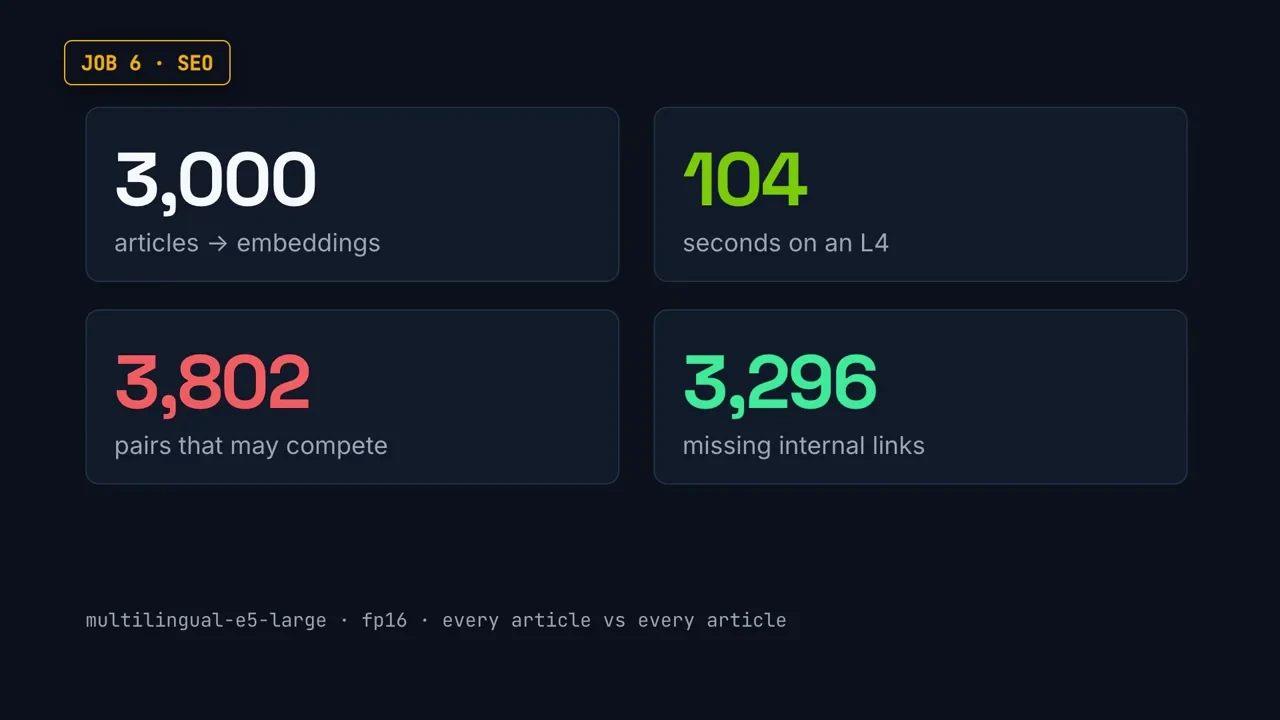
3,000 articles compared pairwise → 3,802 pairs, 3,296 links | 104 s | L4 (fp16). Cannibalization + missing internal links across 3,000 articles. |
RealESRGAN_x4plus and rembg (114.0 s on T4, 148 s on cold L4).Running intfloat/multilingual-e5-large across 3,000 articles took 104 seconds on an L4. Once every article has an embedding vector, pairwise cosine comparison runs in seconds and flags two concrete lists: 3,802 pairs that may compete for the same search query, and 3,296 places where an internal link is missing.
While recording the video on 24 November, my agents also wired in two audio modules: Demucs (splits a song into drums, bass, vocals, and other; on my test music bed it separated drums and light bass with zero vocals) and MusicGen (generates short background beds from text, useful for experiments, though its model weights carry a non-commercial license so it stays out of published videos).
multilingual-e5-large (fp16).Everything above ran out of the compute unit balance included in my plan. A complete cold product-photo job took 0.16 units, while a full sustained hour burns 2.33 units on an L4 or 1.24 units on a T4 (measured 24 November 2026 via colab usage).
Use the estimator below to check how many units a batch would burn at those measured rates, and how many similar batches a 2,707.9-unit balance would cover.
Estimate only: linear calculation from my 24 November 2026 colab usage readings (L4 = 2.33/hr, T4 = 1.24/hr). Real consumption varies with Colab load, cold-start overhead, and whether you remember to run colab stop.
Colab is great for batch jobs and agent offloads, not as a replacement for dedicated GPU hosting. Here are the real limits I hit while building and recording this setup on 24 November 2026:
Lightricks/LTX-Video for 49 frames at 24 fps took 202 seconds on an L4 (24 November 2026), and visual quality is still well behind Google's own Flow model. I keep Flow for real b-roll.colab new --gpu L4 returned Service Unavailable, forcing an immediate fallback to --gpu T4. Build a GPU fallback into every script.colab stop leaves a runtime draining 1.24 to 2.33 units every hour while doing nothing. Also watch model licenses: MusicGen weights are non-commercial only even though they run locally on your GPU.| Workload | Use Colab GPU? | Why (measured 24 Nov 2026) |
|---|---|---|
| Whisper, NVENC, SEO embeddings | Yes (batch) | Amortizes cold startup across a warm session; 3,000 embeddings took 104 s on L4. |
| Product shots, 4× upscale, OCR | Yes (batch) | 0.16 units cold product shot on L4; 4× upscale + cutout in 114 s on T4. |
| Always-on API or webhooks | No | Colab sessions terminate and have no fixed public endpoint. |
| B-roll AI video | No | LTX-Video took 202 s for 49 frames and lags behind Google's Flow model. |
| Commercial background music | No | MusicGen weights carry a non-commercial license only. |
Honest caveat on my own measurements: every figure on this page was measured on a single account on 24 November 2026. Cold VM startup plus weight downloads dominate short one-off jobs (82.4 s on T4 for 21.4 s of Whisper audio), so Colab only feels fast once you batch work onto one warm session or run multi-minute workloads like embeddings and bulk encoding.
Most people pay for Google AI Ultra for Gemini and never open Colab once. That is GPU capacity already included in your subscription, sitting untouched.
With one official Apache-2.0 CLI and a thin wrapper that guarantees colab stop, it turns into a practical batch worker for Claude Code, Codex, and Antigravity. Keep live APIs on proper servers, keep b-roll video on Flow, and send Whisper, upscaling, NVENC renders, screenshot OCR, and SEO embeddings to Colab.
Test it in five minutes tonight: run the four commands below to see the compute unit balance already on your account, confirm an attached NVIDIA T4, and immediately stop the runtime. If Google tightens unit burn rates or L4 capacity under heavier load, the same wrapper still works by changing one --gpu flag or swapping the backend in one file.
uv tool install google-colab-cli --with keyrings.alt
colab usage
colab new -s smoke-test --gpu T4 && colab exec -s smoke-test -f gpu_check.py
colab stop -s smoke-testgoogle-colab-cli stores its OAuth token in your system keyring. Headless Linux servers usually lack a desktop keyring daemon, so adding --with keyrings.alt gives the CLI a working fallback backend so your login persists across shells.Service Unavailable.Real measurements, CLI setups, and limit guards from the same Linux server.
Four days of delegated Antigravity CLI subagents on the same server, Artificial Analysis benchmarks, and quota curves.
Read the guide // claude code75.6% of my Claude week went to rereading old context. The one-line compact fix and a daily tempo script.
Read the guideuv tool install google-colab-cli on 24 November 2026.colab usage readings, 24 November 2026: 2,707.9 compute units balance at 17:35 CET; 1× NVIDIA L4 Standard = 2.33 units/hr (17:35 CET); L4 + T4 active = 3.57 units/hr (17:48 CET); 1× NVIDIA T4 = 1.24 units/hr (18:11 CET).Official Colab CLI setup, automatic colab stop wrappers, and agent routing configured on your server.