// guide · codex + search console mcp

Connect Codex to Google Search Console

Between October 23 and November 19, 2026, three top-7 queries on samautomation.work drew 644 impressions and only 2 clicks. OpenAI Codex pulled those numbers live from Google Search Console in one terminal prompt. Here is the exact 6-step MCP setup and both prompts I used.

I run over a hundred sites with Codex and Claude Code. Every command, prompt and query figure below comes straight from the live recording on samautomation.work.

2:21 walkthrough · live terminal on samautomation.work Watch on YouTube
// real output · oct 23 to nov 19, 2026

Three top-7 queries, 644 impressions, 2 clicks

Most people open Search Console to look at their top clicks. The faster win sits in queries that already rank on page one but earn almost no clicks. One prompt over MCP pulls them straight into your terminal.

644
Combined impressions across three top-7 queries on samautomation.work in 28 days.
2 clicks
Total clicks earned from those 644 impressions. Two of the three queries got zero clicks.
0.5% CTR
Click-through rate on capcut api at average position 7.0 with 384 impressions.

When I asked Codex for queries on samautomation.work with at least 50 impressions and a CTR below 2% over the 28-day window from October 23 to November 19, 2026, three page-one queries jumped out immediately:

Query Impr. Clicks Pos. CTR
capcut api 384 2 7.0 0.5%
alternatives to building an in-house video rendering api 161 0 1.4 0.0%
what are the benefits of using an ai caption generator compared to manual captioning? 99 0 4.2 0.0%

Fix those titles first. Getting more clicks from rankings you already hold takes ten minutes and beats guessing which new article to write next.

These figures come from one 28-day window on one site (samautomation.work). They show what the prompt surfaces on a real property, not an industry benchmark. The rounded positions (7.0, 1.4, 4.2) match the unrounded terminal rows (6.97, 1.45, 4.22) shown on the right.
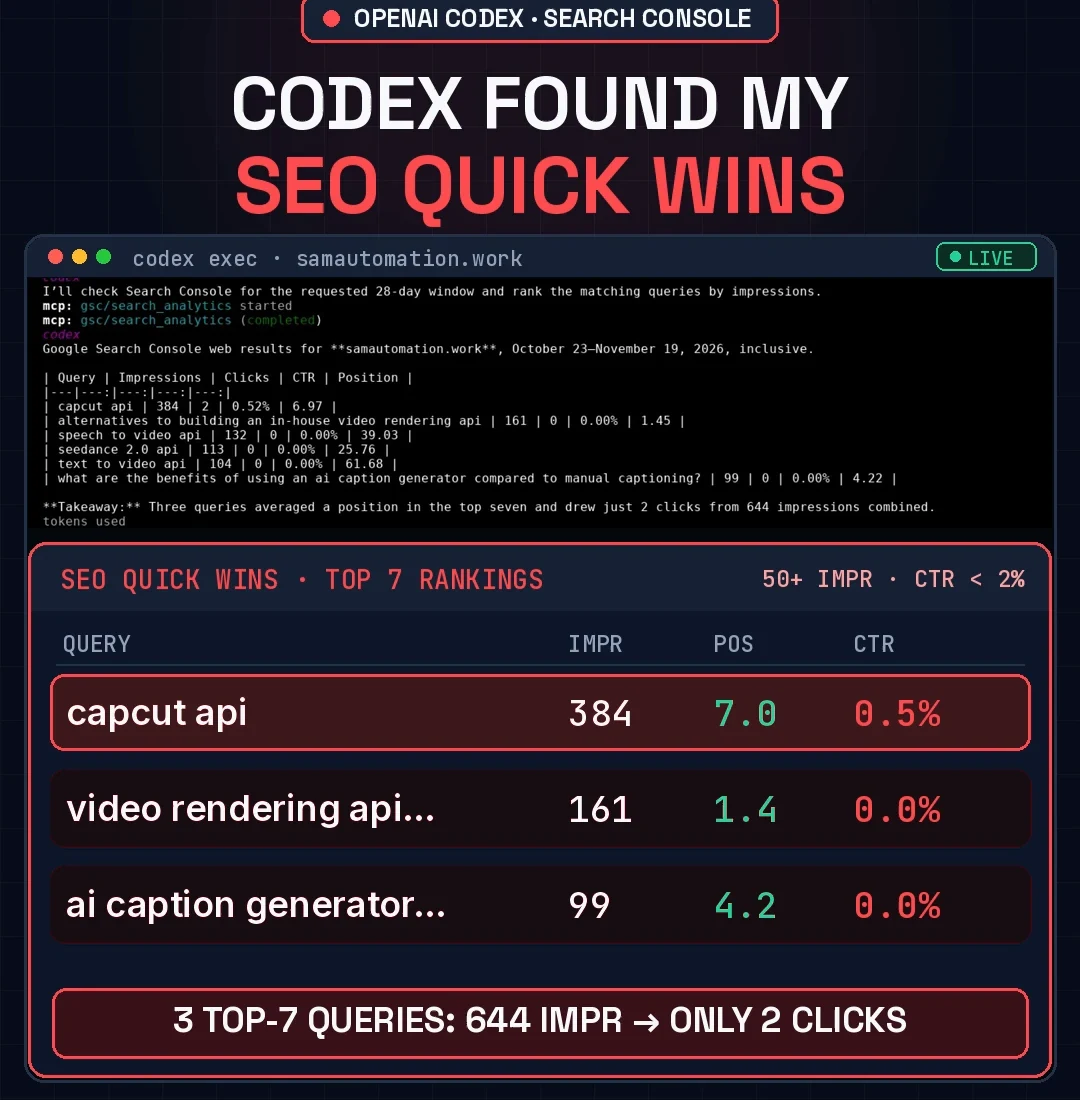
Live Codex CLI output showing Google Search Console quick wins for samautomation.work from October 23 to November 19, 2026: capcut api with 384 impressions at position 7.0 and 0.5% CTR, video rendering api with 161 impressions at position 1.4 and 0.0% CTR, and ai caption generator with 99 impressions at position 4.2 and 0.0% CTR.
The exact terminal response from codex exec calling mcp-server-gsc on samautomation.work (Oct 23 to Nov 19, 2026).

The 6-step MCP setup

You wire Google Cloud once, grant read-only access in Search Console, and register mcp-server-gsc in Codex. No custom wrapper script needed.

Create a Google Cloud project

Open Google Cloud Console and create a new project. Any clear name works, such as codex-gsc.

Enable the Google Search Console API

Open the API Library inside that project, search for Google Search Console API, and click Enable.

Create a service account

Go to IAM & Admin, then Service accounts, and create a new one. A name is enough; skip the optional project roles.

Download the JSON key

Open your new service account, go to the Keys tab, click Add key, choose Create new key, and pick JSON. Save the file outside your git repository (for example gsc-key.json in a local credentials folder). Treat that file like a password and never commit it to git.

Add the service account in Search Console

In Google Search Console, open your property, go to Settings, then Users and permissions, and add the service account email address. Restricted access is enough to read query and performance data.

Add the MCP server in Codex and verify

From the directory holding your key (or with an explicit absolute path outside your repo), register the npm package mcp-server-gsc with Codex:

terminal · register mcp server
codex mcp add gsc --env GOOGLE_APPLICATION_CREDENTIALS=$PWD/gsc-key.json -- npx -y mcp-server-gsc

Check that Codex loaded it:

terminal · verify
codex mcp list

You should see gsc listed as enabled, with your GOOGLE_APPLICATION_CREDENTIALS path hidden in the output.

Keeping your key file outside your repo means you never have to worry about a stray git add . leaking Search Console credentials. If you want Search Console history beyond Google's 16-month window as well, pair this with my Search Console to BigQuery setup.

Two prompts to run right after setup

Replace https://yoursite.com/ with your exact Search Console property URL (or sc-domain:yoursite.com if you verified a domain property). Both prompts end three days ago so incomplete recent Search Console days do not skew the numbers.

1. Pull your top 5 queries by clicks

Good first smoke test. Codex calls Search Console live and prints a clean markdown table right in your terminal:

prompt 1 · top 5 queries
codex exec "Top 5 search queries by clicks for https://yoursite.com/ in the last 28 days (ending 3 days ago). Short markdown table with Query, Clicks, Impressions, CTR, Position."

2. Find low-CTR quick wins

This is the prompt worth running every week. It filters for queries with 50 or more impressions and a CTR below 2%, sorted by impressions, with a one-line takeaway at the bottom:

prompt 2 · seo quick wins
codex exec "Which queries for https://yoursite.com/ have 50+ impressions and CTR under 2% in the last 28 days (ending 3 days ago)? Top 6 by impressions as a short table (Query, Impressions, Clicks, CTR, Position) plus a 1-line takeaway."

Two rules worth keeping after day one

The setup itself is free to run with your own Codex CLI and Google Cloud project. If you run multiple sites and want Codex, Claude Code, Search Console reporting and guardrails wired up on your own box, see my agent setup guide and server install.

// watch & next steps

Related guides and video

The full walkthrough video on YouTube, plus two companion guides from the same server setup.

Sources and measurement scope, checked 23 November 2026

  • Live recording: "How to Connect Codex to Google Search Console (Complete Setup Guide)", SamAutomation YouTube channel (youtu.be/aj0q9fN7Z5Q), published 23 November 2026.
  • MCP server package: mcp-server-gsc on npm, invoked via npx -y mcp-server-gsc with GOOGLE_APPLICATION_CREDENTIALS.
  • Search Console numbers: live codex exec query against samautomation.work for October 23 to November 19, 2026 inclusive (three top-7 queries totalling 644 impressions and 2 clicks: capcut api 384 / 2 / 0.52% / pos 6.97; alternatives to building an in-house video rendering api 161 / 0 / 0.00% / pos 1.45; what are the benefits of using an ai caption generator compared to manual captioning? 99 / 0 / 0.00% / pos 4.22). Single-site data, not a general benchmark.

Want Codex, Claude Code and Search Console wired on your server?

Free setup notes and templates, or tell me what you run and I will send a plan for installing the full agent box on your own machine.