Fastest route from this page
Fresh search data shows that most visitors landing on this page are looking for one of four things: CapCut API docs, an n8n path, auto-captions, or pricing. Use the shortcuts below instead of scanning the full guide.
CapCut API docs intent
Open the JSON Video API docs
See endpoints, payloads, async rendering flow and implementation examples.
CapCut API n8n intent
See the n8n workflow path
Use HTTP Request nodes for rendering, captions, webhooks and publishing flows.
Caption automation intent
Go straight to AutoCaptions
Replicate the CapCut auto-caption workflow with API-driven subtitle generation.
Commercial intent
Check plans and pricing
See the free tier, production plans and how volume pricing compares to manual editing.
Quick answer
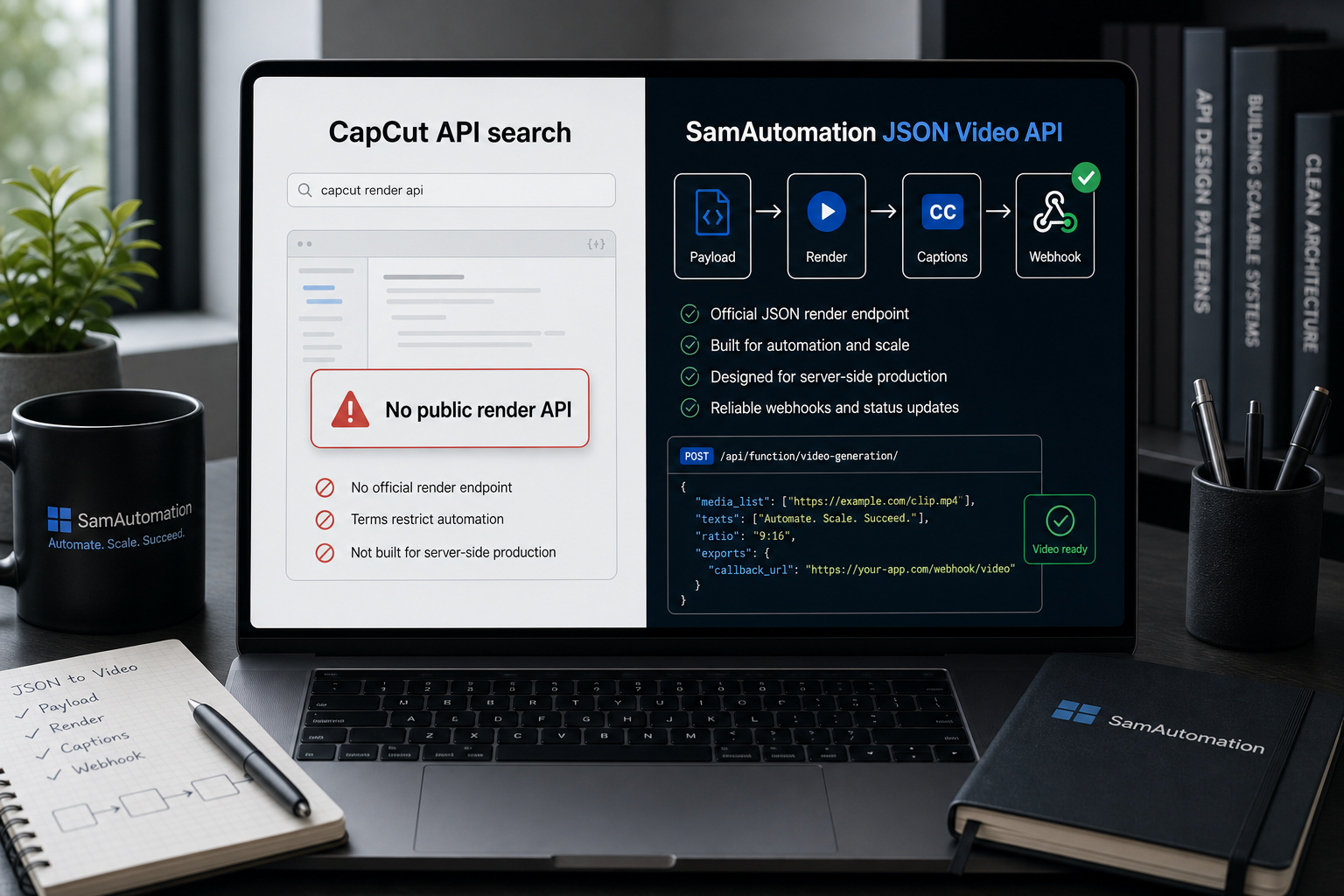
CapCut does not have a public REST API for automated video rendering, batch editing or server-side captions. The official CapCut developer docs cover editor-platform/plugin use, not a backend render endpoint you can call from n8n, Make or your app. If your goal is automated video creation, the practical path is: JSON-to-Video for rendering, AutoCaptions for subtitles, n8n or Make.com for orchestration, and pricing plus docs to get started.
2026 search-data note
This page now ranks on page one for CapCut API, documentation, developer and automation variants, but most impressions still do not click. The fastest improvement is clearer routing: docs for developers, n8n for workflow builders, AutoCaptions for subtitle teams and pricing for commercial checks.
What Google is rewarding
The current top results split into three buckets: official CapCut AI/template pages, GitHub projects that expose unofficial editing wrappers, and JSON2Video-style alternatives that answer "does CapCut have an API?" directly. That means this page should not pretend all searches want the same thing. Use it as the canonical answer for CapCut API availability, then route implementation searches to the documented JSON video API, AutoCaptions, n8n setup and pricing pages.
CapCut API documentation intent
Official CapCut API docs vs unofficial APIs vs SamAutomation
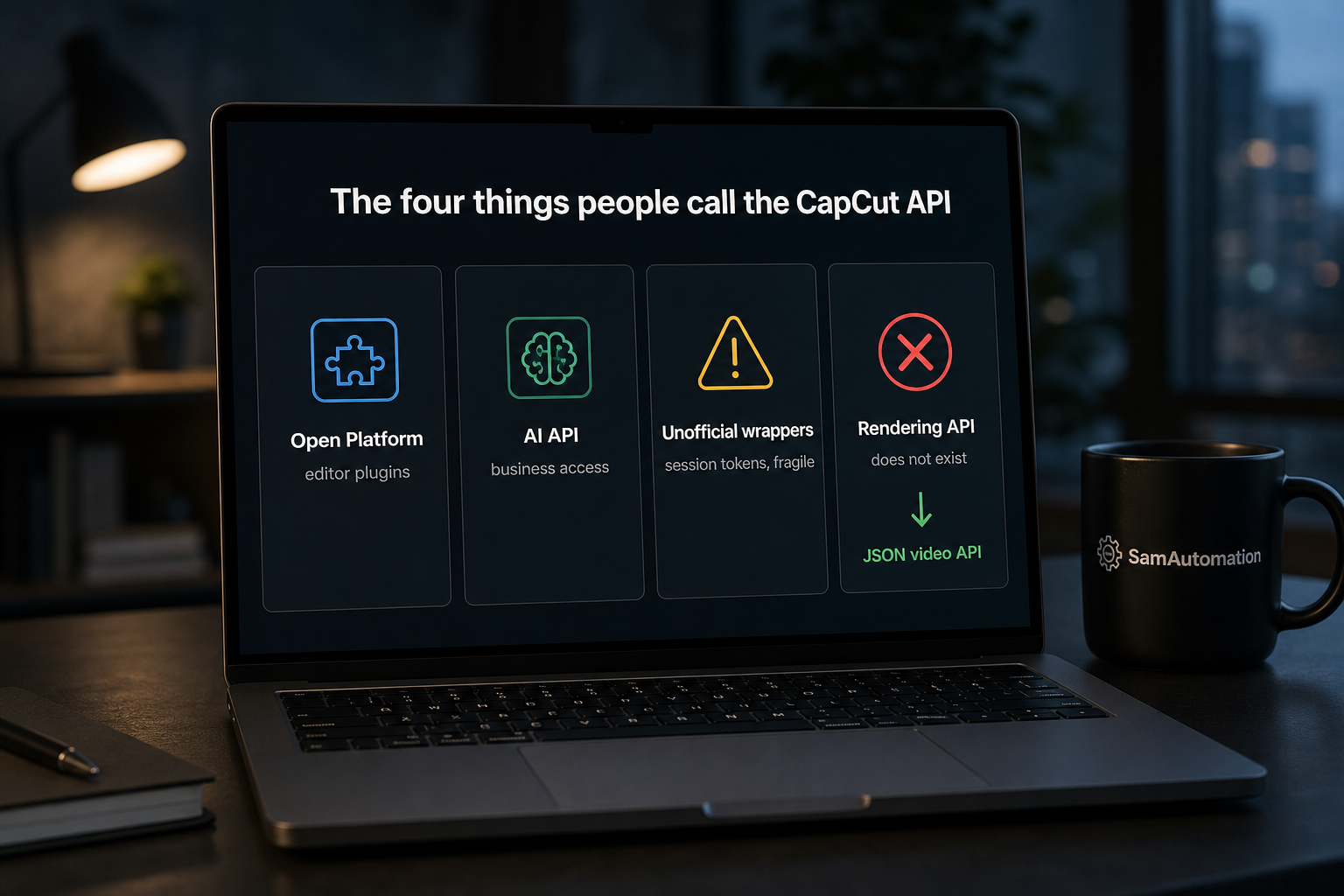
Search results for CapCut API documentation mix three different things. CapCut's official Open Platform is for editor plugins. Unofficial APIs try to expose private CapCut behavior. SamAutomation is the production route when you need documented REST endpoints for rendering, captions, async status and n8n workflows.
Official CapCut Open Platform
Best for editor plugins. Not built for server-side video rendering, batch captions, webhooks, or n8n HTTP workflows.
Unofficial CapCut APIs
Can rank well because they show endpoints, but production risk is higher when behavior depends on reverse-engineered private APIs.
SamAutomation video API
Use this for JSON video rendering, AutoCaptions, progress polling, webhooks, n8n, Make.com, and pricing you can plan against.
| Developer job | SamAutomation endpoint or route | Why it matters |
|---|---|---|
| Render a video from JSON | POST /api/function/video-generation/mix-video |
Direct replacement for the automation job people expect from a CapCut API. |
| Track render progress | GET /api/function/video-generation/progress/{id} |
Lets n8n, Make.com and custom apps wait for the finished video. |
| Add social captions | AutoCaptions workflow | Matches the highest-value CapCut use case: captioned TikTok, Reels and Shorts output. |
| Build the same flow in n8n | n8n setup guide | Gives workflow builders the next click without turning the whole page into a docs manual. |
| Check production limits | Plans and pricing | Answers the commercial question before a developer starts prototyping. |
Does CapCut Have a Public API?
No. As of April 15, 2026, CapCut does not offer a public API for automated video rendering, caption generation, or batch processing. CapCut's "Open Platform" is limited to building plugins that run inside the CapCut editor — it does not expose endpoints for server-side video generation.
This means you cannot use CapCut programmatically. There's no way to send a JSON payload, receive a rendered video, or integrate CapCut into an n8n or Make.com workflow. The CapCut API documentation that exists is exclusively for plugin development, not video automation.
If you're looking for CapCut-like capabilities — automatic captions, video composition, text overlays, transitions — through a developer-friendly API, that's exactly what SamAutomation's JSON Video API provides.
CapCut API Key: What You Can and Can't Get
There is no developer portal where you sign up and copy a CapCut rendering API key. The "keys" you'll find mentioned online fall into three buckets:
- Open Platform plugin credentials — for building plugins that run inside the CapCut editor, not for calling CapCut from your own server.
- AI API access — CapCut markets an AI API for select features, but access runs through their business channels, not a self-serve key page.
- Unofficial wrapper "keys" — projects like CapCutAPI on GitHub work with session tokens from your own account. That can break on any update and may violate CapCut's terms, so don't build a product on it.
If you need a key you can create in a minute and call from cURL, that's what a JSON video API is for: grab a SamAutomation API key and render your first MP4 from a JSON payload.
CapCut API Pricing vs CapCut Pro
CapCut Pro pricing is for the editor: a subscription that unlocks premium effects, assets and exports inside the app. It is not API pricing — there is no public price list for calling CapCut from code, because there is no public rendering API to call. When people search for CapCut API pricing, they usually want to know what automated rendering costs. For that comparison: SamAutomation prices per render through credits — current numbers are on the pricing page, and the free tier needs no card.
Can You Automate CapCut Desktop?
Not officially. CapCut Desktop has no automation API, no CLI and no scripting hooks. What people try instead: UI macro tools like AutoHotkey on Windows or Keyboard Maestro and AppleScript on macOS that click through the editor. It works for a demo and breaks on the next update, resolution change or unexpected dialog — and batch rendering ties up a real machine for every video. If the goal is CapCut-style videos without opening CapCut, rendering from a JSON template via an API is the boring, reliable version of the same idea: see the JSON-to-video guide.
Is CapCut Still Safe to Use?

This is the question underneath most CapCut searches in 2026, so it is worth answering plainly. In June 2025 CapCut updated its terms of service and the licence clause is what upset people: by uploading, you grant a perpetual, worldwide, royalty-free and irrevocable licence to use, edit, distribute and commercially exploit your content, sublicensable to third parties, including for AI training. Legal commentators also flagged the wording around biometric data — facial and voice features — as unusually broad.
Two things are true at once. The clause is wide, and it is not unique: TikTok and Instagram carry similar licence language, and CapCut's earlier terms already contained an irrevocable licence. What changed is that people read it. This is not legal advice, and it is not a reason to panic — it is a reason to check the licence clause of every tool that touches your footage, ours included, before you upload a client's material to it.
For automated pipelines it matters in a practical way too. An editor you drive by hand has your project files; a rendering API has whatever you send it and returns a file. If you work for clients under an NDA, the licence clause and the retention policy are the two paragraphs that decide whether you can use a tool at all — not the feature list.
Why Developers Search for a CapCut API
CapCut is the most popular free video editor for short-form content. Millions of creators use it for TikTok, Instagram Reels, and YouTube Shorts. Naturally, developers want to automate what CapCut does manually — especially these features:
Auto-Captions
Word-by-word highlighted subtitles burned into the video. The #1 most requested feature for automation.
Batch Rendering
Generate 50-500 videos from templates with different text, images, and audio — without opening an editor.
Template Automation
Define a video structure once (JSON), then swap variables (product name, price, image) for each render.
Workflow Integration
Connect video generation to n8n, Make.com, Zapier, or custom code for end-to-end automation.
CapCut vs SamAutomation: Feature Comparison
A side-by-side comparison of what CapCut offers (manually) vs what the SamAutomation API provides (programmatically).
| Feature | CapCut (Manual) | SamAutomation API |
|---|---|---|
| Public API | No public API | Full REST API |
| Auto-Captions | Manual in editor | API-driven, 30+ languages |
| Batch Processing | One video at a time | Unlimited concurrent renders |
| n8n Integration | Not possible | Native HTTP nodes |
| Make.com Integration | Not possible | HTTP module support |
| JSON Templates | Not available | Full JSON schema |
| AI Video Generation | Limited AI features | 29+ AI models (Kling, Veo, Wan) |
| Webhook Callbacks | Not available | Signed webhooks |
| Export Destinations | Download only | Webhook, FTP, SFTP, Email |
| Pricing | Free (manual work) | From €29.95/month |
| Aspect Ratios | 9:16, 16:9, 1:1 | Any custom ratio |
How the CapCut API Alternative Works
Four steps from input to published video — no editor needed.
Prepare
Choose your images, video clips, voice-over (upload or TTS), and aspect ratio (9:16, 1:1, 16:9).
Send JSON
Post a JSON payload to the API with media URLs, text overlays, styles, and caption settings.
Render & Caption
The API renders your video server-side, burns in captions, and returns a download URL via webhook.
CapCut Auto-Captions via API
CapCut's auto-caption feature is one of the main reasons people search for a CapCut API. The ability to automatically transcribe speech and burn stylized subtitles into video is essential for social media content — 85% of video on Facebook and Instagram is watched without sound.
SamAutomation's AutoCaptions replicates this feature via API:
Speech-to-Text
AI transcription in 30+ languages. Upload any video or audio file — get word-level timestamps and accurate transcription.
Caption Styles
Word-by-word highlight, bottom bar, sentence with background, animated reveal. Customize fonts, colors, shadows, and positioning.
Burn-In or SRT
Get subtitles burned directly into the video, or export as SRT/VTT files for platform-native captions.
Using n8n Instead of a CapCut API
Many developers search for "CapCut API n8n" or "n8n CapCut" — they want to automate video creation in n8n with CapCut-like features. Since CapCut has no API, n8n cannot connect to it. But n8n + SamAutomation provides the same result: automated video generation with captions.
Example n8n Workflow: Auto-Captioned Video Pipeline
1. Trigger → Webhook receives content data (text, images, audio URL)
2. HTTP Request → POST to SamAutomation JSON Video API with media + settings
3. Wait → Poll for render completion (10-30 seconds)
4. HTTP Request → Send rendered video to AutoCaptions API
5. Wait → Poll for caption completion (5-15 seconds)
6. HTTP Request → Post captioned video to TikTok / Instagram / YouTube
Full workflow templates available in our templates marketplace.
CapCut API Alternative for Make.com
Searching for "CapCut API Make.com integration"? CapCut has no Make.com module because there's no API to connect to. SamAutomation works with Make.com through standard HTTP modules — the same way you'd integrate any REST API.
Use Make.com's HTTP module to send JSON payloads to SamAutomation, receive webhook callbacks when videos are ready, and chain the output to social media posting scenarios.
Example: CapCut-Style Video via JSON API
Send this JSON payload to create a captioned video — the same result as CapCut, fully automated.
{
  "type": "ImageVideo",
  "data": {
    "background_url": "https://example.com/music.mp3",
    "voice_url": "https://example.com/voiceover.mp3",
    "media_list": [
      {"type": "image", "url": "https://example.com/frame-1.jpg"},
      {"type": "image", "url": "https://example.com/frame-2.jpg"},
      {"type": "video", "url": "https://example.com/clip.mp4"}
    ],
    "transcripts": [
      {"words": "Your product showcase starts here", "start": 0.00, "end": 1.50},
      {"words": "With automatic captions and branding", "start": 1.50, "end": 3.20}
    ],
    "settings": {
      "aspect_ratio": "9:16",
      "background_volume": 0.15,
      "voice_volume": 1.0,
      "font_size": 96,
      "stroke_color": "#000000",
      "stroke_width": 6,
      "caption_style": "bottom_bar"
    }
  }
}
See the full schema in our API documentation. Python, JavaScript, and cURL examples available in the developer guide.
Who Uses a CapCut API Alternative?
Marketing Agencies
Generate hundreds of client videos per month from templates. One team, 10x output. Read the agency guide.
E-commerce Stores
Auto-generate product videos from WooCommerce or Shopify data. New product listed = video ready in 60 seconds. See how.
Content Creators
Build daily content pipelines with n8n. AI generates scripts, API renders videos, AutoCaptions adds subtitles. Build your pipeline.
SaaS & App Developers
Embed video generation into your product. Let users create videos from your platform via API integration.
CapCut API Alternative: Pricing
CapCut is free for manual editing. An API-driven alternative has infrastructure costs. Here's what SamAutomation costs compared to hiring editors:
| Approach | Monthly Cost | Videos/Month | Cost/Video |
|---|---|---|---|
| CapCut (manual editing) | Free (your time) | ~30 (at 1 hr each) | Your hourly rate |
| Freelance editor | €1,500-3,000 | 50-100 | €25-60 |
| SamAutomation Basic | €29.95 | 100-300 | €0.10-0.30 |
| SamAutomation Pro | €49.95 | 500+ | €0.05-0.10 |
See all plans at samautomation.work/subscriptions/plans.
CapCut API: Frequently Asked Questions
Is there official CapCut API documentation for developers?
CapCut documents its Open Platform plugin SDK, but that is not a video rendering API. You can build editor extensions, but you cannot use it to generate videos, add captions, or batch-process content from your server.
What is the difference between CapCut Open Platform and a video automation API?
CapCut Open Platform is for building editor plugins. A video automation API is for server-side rendering: you send JSON, poll status, receive a video URL, and trigger the next step in n8n, Make.com, or your own app.
Should I use an unofficial CapCut API?
Use unofficial CapCut APIs cautiously. They can be useful for experiments, but production workflows need stable docs, authentication, error handling, webhooks, and billing. SamAutomation's documented REST API is the safer fit.
Can I use CapCut with n8n for automation?
CapCut has no public rendering API for n8n to call. SamAutomation's JSON Video API works through HTTP Request nodes for rendering, captioning, and publishing workflows.
Can I use CapCut with Make.com for video automation?
CapCut has no public rendering API or Make.com module. SamAutomation works with Make.com through standard HTTP modules using the same REST API and JSON payloads.
Is the CapCut API free?
There is no public CapCut rendering API, free or paid. SamAutomation offers a free tier for testing and paid production plans.
Why are people leaving CapCut?
Mostly the June 2025 terms of service. The licence clause grants CapCut a perpetual, irrevocable, sublicensable right to use and commercially exploit uploaded content, including for AI training, with broad wording around biometric data. Similar clauses exist at TikTok and Instagram, but the CapCut update is the one that got read. The full answer is above.
Is CapCut AI Creator free?
CapCut's AI features sit behind a mix of free limits and CapCut Pro, and which features are free changes per region and release. Treat any "free forever" claim about a specific AI feature as temporary — the pricing page at the moment you read it is the only reliable source.
Is there a free CapCut API?
No. CapCut offers no public rendering API at all, free or paid. If you need to test a CapCut-style JSON-to-video workflow without paying, the SamAutomation free plan renders 5 JSON videos per month at no cost — enough to validate a payload before upgrading.
How do you automate video editing in CapCut?
Not through an official API. The routes people use are desktop automation — scripting the app with UI automation — and unofficial project-file manipulation. Both break when the app updates. Server-side rendering from a JSON payload is the only route that survives a version bump, which is why this page exists.
What is an API and why would I need one here?
An API is an address your program can call instead of a person clicking. For video it means: send a request describing the video, get back a file URL. That turns "someone edits forty clips on Friday" into a step in a workflow that runs whether or not anyone is at a desk.
Does the alternative support CapCut auto-captions?
Yes. AutoCaptions transcribes speech, creates timed subtitles, and burns them into videos with reusable styles and API-driven batch processing.
Can I automate CapCut for bulk video editing?
CapCut requires manual editing for each video. For bulk automation, define a JSON video template once and render variations by changing its text, images, and audio through API calls.
Which platforms does the CapCut API alternative support?
Render vertical, square, landscape, or custom aspect ratios for TikTok, Instagram, YouTube, Facebook, LinkedIn, and other platforms.
Is CapCut really free?
The editor is free to use; CapCut Pro is a paid subscription for premium features and assets. For automation the distinction barely matters: neither the free nor the Pro version comes with a public rendering API.
Learn More
CapCut SDK vs API
Developer-focused breakdown of SDK tooling versus production video API workflows.
CapCut API Alternatives in 2026
Full comparison of all CapCut alternatives with pricing, features, and code examples.
n8n Video Automation Guide
The complete guide to building video automation workflows with n8n and a JSON Video API.
Automate Video Captions
How to automate caption generation at scale with API and n8n workflows.
The real state of CapCut API access
Do not treat every search result for a CapCut API as official developer access. CapCut’s consumer editor, CapCut Pro, templates and any partner or business tools are separate products. An API key, SDK file or CapCut APK from GitHub does not prove that CapCut issued it.
Start with CapCut’s official developer pages and product documentation. Check that the documentation names the supported product, authentication method, endpoints, permissions and usage limits. If those details are missing, you may be looking at an unofficial wrapper, desktop automation script or reverse-engineered endpoint.
A CapCut Pro key, free account generator, modified APK or supposed free API hack is not a safe substitute. It may expose your login, stop working after an app update or breach the service terms. CapCut settings and regional availability can also change, so verify current access in the official product before building around it.
API keys, documentation and SDKs
An API lets one program send structured requests to another. An API key identifies the calling project. An SDK packages helper code, types or examples around an API. Installing an SDK does not grant access by itself; you still need an approved account and valid credentials.
Get documentation and keys from the provider’s own developer dashboard. Never download a CapCut API key from GitHub, Reddit, an APK site or a “key generator.” Public repositories can contain useful examples, but secrets committed to a repository should be treated as compromised.
For Python automation, keep the key in an environment variable, send a documented request and handle authentication errors, rate limits and failed renders. If you need a supported programmable workflow now, compare a dedicated JSON-to-video rendering workflow with the manual features in CapCut.
Practical video automation without a CapCut endpoint
You can automate the work around CapCut even when a required editing action has no documented endpoint. Generate a render plan, script, voice track, captions and media files first. Then import the finished assets into CapCut for the last manual edit.
For a fully automated route, send structured scene data to a renderer. A JSON-to-video rendering pipeline can control clips, timing, text, audio and exports without clicking through a desktop editor. Python or JavaScript can create the JSON and poll the render job until it succeeds or fails.
n8n can collect input, call APIs, wait for asynchronous jobs and move the output to storage or a publishing step. Use the n8n video automation setup for that orchestration layer. n8n templates should store credential references, not raw API keys.
For short background loops, generate or select a source clip, trim it to a repeatable segment and render a seamless transition where needed. A free API is only suitable if its current license, watermark rules, rate limits and output rights match your use.
Text to speech, captions and karaoke text
CapCut includes text-to-speech and caption tools in supported app versions, but voices and controls can move or disappear by device, region or release. If text to speech is not showing, update the app, check the selected language and account region, then confirm the feature in CapCut’s current help pages.
A TTS API normally charges per character, audio duration, request or credit. Free tiers may exist, but they can change. ElevenLabs API documentation and its dashboard are the right places to check current access and ElevenLabs TTS API pricing; a Reddit post is not a pricing source.
Automatic subtitles follow a simple pipeline: transcribe speech, return timed segments, review the words, then burn captions into the video or export a subtitle file. Our automatic caption workflow shows the same process without relying on a TikTok subtitles API.
Karaoke text needs word-level or line-level timing plus an active highlight style. In CapCut, add the lyrics, align each line to the audio and apply the available text animation. For automation, generate timed caption data and let the renderer update the active words.
AI video models, avatars and unified APIs
A unified AI API gives one authentication and request layer for several AI models. It can reduce provider-specific code, but it does not make model pricing, output formats or safety rules identical. “Unified accounting API” is a different concept and does not describe AI model routing.
A useful unified API example accepts a prompt and model name, converts that request to the selected provider’s format, then returns a normalized job status and result URL. Open-source gateways can provide this routing layer, but you still need legitimate access to the underlying models.
Seedance 2.0 API, Wan 2.7 API and Wan2 7 Image Pro availability should be checked through each model owner’s official site or an authorized provider. Do not rely on a free API hack, GitHub key or download bundle. Pricing commonly depends on credits, executions, generated duration, resolution or model tier, and rates change.
For choosing a model rather than an editor, compare the supported options in our AI video model directory. AI avatar APIs, including interactive or live-avatar products, usually take text or audio plus an avatar configuration and return a rendered video or stream.
Pricing, accounts and creator earnings
| Product | How pricing is usually measured | What to verify |
| CapCut app or CapCut Pro | Subscription or purchase shown for your account and region | Plan, billing period, platform and included features |
| Video editing API | Per execution, operation, render minute or credit | Resolution, storage, export and retry charges |
| TTS API | Per character, audio duration, request or credit | Voice access, commercial rights and limits |
| AI video or avatar API | Per generation, duration, model tier or credit | Failed-job policy, output rights and rate limits |
There is no universal CapCut API pricing figure. There is also no fixed amount that CapCut creators get paid. Earnings depend on the active creator program, eligibility, region, accepted templates or content, performance rules and current program terms.
Check the checkout screen or official pricing page for the current CapCut Pro monthly price, one-month plan, annual plan and purchase terms. Rates change. A reseller or “Cap card Pro” listing is not proof of an official subscription.
Publishing APIs, ownership and safety checks
TikTok offers developer products for approved use cases, including a Content Posting API and separate TikTok Shop APIs. Access, review requirements, scopes and publishing settings can change. Read the current TikTok API documentation before promising automatic posting.
CapCut is associated with ByteDance, the company behind TikTok, and originated in China. Questions about bans or safety depend on country, date, law, app version and the data you share. Check current government guidance and the provider’s privacy terms instead of treating an old ban headline as a worldwide product status.
People leave editing tools for different reasons: price changes, regional restrictions, workflow changes, feature availability, privacy concerns or a need for programmable rendering. Test the exact export, caption, collaboration and automation steps you need before moving a production workflow.
Questions people ask
Does CapCut have an official developer API?
Do not assume the consumer editor exposes a public, general-purpose video editing API. Check CapCut’s current official developer pages for the exact product and endpoints you need. Unofficial wrappers and desktop automation scripts are not the same as an official CapCut developer API.
How do I get CapCut API documentation and an API key?
Use CapCut’s official developer or partner portal and create an approved project if that option is offered for your use case. The portal should explain authentication, permissions and limits. Do not download a key from GitHub, Reddit or an APK site.
Can I use a CapCut or AI API for free?
A provider may offer a trial or limited free tier, but there is no permanent free-access rule. API keys can be issued without a separate fee while usage is still paid. Check the current dashboard because rates and limits change.
Can CapCut automatically edit videos?
CapCut can automate parts of editing through features such as templates, captions and AI tools available in the app. Full unattended automation requires documented programmatic access or an external renderer. Desktop click automation is fragile because interface updates can break it.
Does CapCut have an MCP server?
Do not treat a community project called “CapCut MCP” as an official CapCut product. An MCP server can wrap tools or unofficial automation, but it still needs a legitimate underlying interface. Check its source, permissions and authentication before connecting an account.
Can I automate CapCut with Python, GitHub code or n8n?
Python and n8n can prepare scripts, media, captions and render instructions. They can call CapCut only where a documented interface permits it. GitHub projects that control the desktop app or private endpoints may break after updates and can create account or security risk.
Can I do text to speech and automatic subtitles in CapCut?
CapCut supports text-to-speech and caption features in supported versions, but their location and availability can vary. If a feature disappeared, check the current app version, language, region and official help pages. For stable automation, use a documented TTS or transcription API and import the result.
Are ElevenLabs and other TTS API keys free?
There is no single rule: the provider may offer a trial or limited tier, while larger use is billed by its current model. Get an ElevenLabs API key and documentation from the official dashboard. Never reuse a key posted on Reddit or GitHub.
Is the Seedance 2.0 API available and free?
Confirm Seedance 2.0 API access on the model owner’s official website or through an authorized provider. Availability, documentation, model names and pricing can change. A “free API hack” or public key is not legitimate access.
What does the Wan 2.7 API cost?
There is no safe fixed figure to quote without a current provider and model endpoint. Providers may charge per generation, image, video duration or credit, with different rules for resolution and failed jobs. Check the current Wan 2.7 API pricing page before running a batch.
How do I make a karaoke video with lyrics in CapCut?
Add the audio and lyrics, split the text into timed lines or words, then align each segment with the vocal. Apply the available text animation or highlight style and preview the timing. On PC and mobile, control names can shift between releases.
Does TikTok have an API for posting and subtitles?
TikTok provides developer products for approved publishing use cases, including the Content Posting API. It does not mean every account can post without review or that a separate subtitles endpoint fits your workflow. Generate timed captions yourself when the required subtitle interface is unavailable.
How much does CapCut Pro cost, and can I get it free?
Check CapCut’s current checkout for your country, device and billing period because subscription prices change. Use an official trial if one is offered. Free-account generators, Pro keys, sellers and modified downloads can expose your account or payment data.
Why was CapCut banned, and is it still safe in 2026?
Restrictions have differed by country and have involved legal, national-security or data-governance concerns. Current availability is time-sensitive, so check guidance for your country and the official app store. Review the permissions and privacy terms before uploading sensitive footage.
Is a text-to-speech (TTS) API free?
TTS free tiers exist and are capped by characters per month, with a limited voice list. If the same voice has to appear in every video for a year, budget for a paid one — free voice line-ups change without notice.
How do I get my API key?
Sign up, open the developer or API section of your dashboard and create one. Keep it on the server and load it from an environment variable — never in browser JavaScript, a public repo or a shared template.
What is an SDK in API terms, and how is it different?
An API is the address you call over the network. An SDK is a package you install that calls that API for you, in your language, with types and helpers. An SDK with no API behind it can only do what runs on your own machine — which is exactly the CapCut situation.
Why is CapCut Pro considered expensive?
It is a per-seat subscription for an editor, so the cost scales with people rather than with output. Fine for one creator, painful for a team producing hundreds of videos — which is the moment people start looking for an API.
Stop Waiting for a CapCut API
Create your first automated video in 5 minutes. No CapCut needed — just JSON in, video out.
No credit card required