Marketplace  /  RSS News Digest to Trello & Email

RSS News Digest to Trello & Email

Other

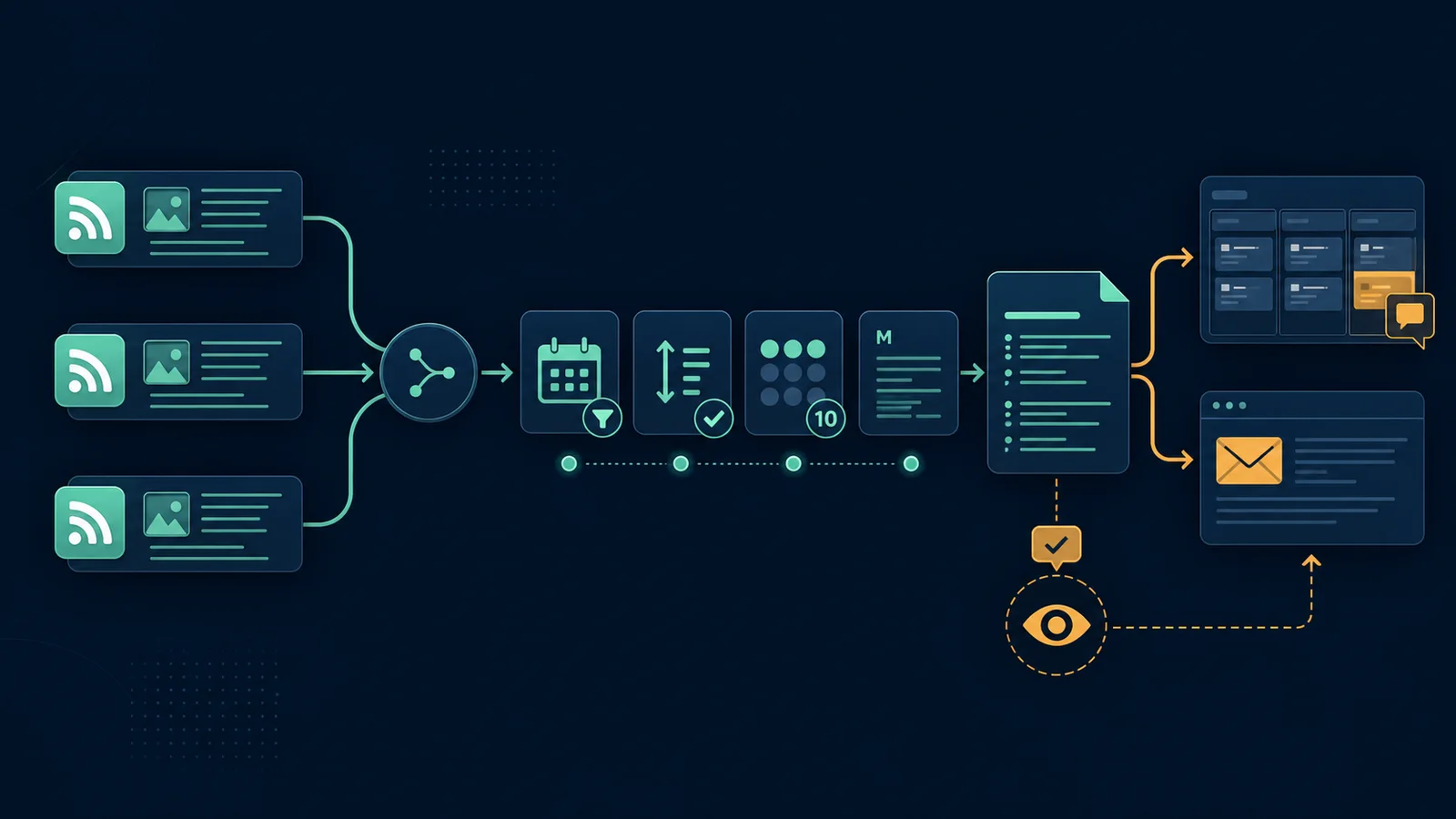
Combine three RSS feeds, keep recent items, sort them by publication date and turn the best ten links into a weekly review digest. The 15-node workflow sends the same structured brief to Trello and Gmail without republishing source articles.
Workflow JSON included Setup steps included API requirements listed One-time purchase
RSS workflow filtering recent articles into a ten-item digest for Trello review and email delivery
€19.95One-time purchase or included with annual, Ultimate + LTD
Free account required for purchase Or get every template for life from €149.95 →

Import readiness

What to verify before using this n8n template

# workflow file
✓ included — n8n workflow JSON attached to this template
# required accounts
✓ listed — see required APIs & services below
# setup instructions
✓ included — full steps below to estimate effort

Workflow JSON

The downloadable n8n workflow file is attached to this template.

Required accounts

Required APIs, credentials and services are listed on this page.

Setup effort

Setup instructions are included below so you can estimate implementation time before buying.

Workflow fit

Best when you want the same researched process to run consistently without rebuilding the node chain for every job.

Key features

  • 15 connected n8n nodes with a weekly trigger and manual test path
  • Reads three configurable RSS feeds and merges their items
  • Filters out older stories before sorting by publication date
  • Caps each digest at ten links to keep editorial review manageable
  • Formats a readable Markdown brief with source links
  • Updates a Trello review card and sends the digest through Gmail

Setup instructions

1. Import the workflow JSON into n8n.

2. Replace the three example RSS URLs with feeds you are allowed to monitor. Run each RSS node separately and confirm it returns a title, link and publication date.

3. Add your Trello credential and replace YOUR_TRELLO_CARD_ID in Update Trello review card.

4. Add your Gmail credential and replace YOUR_REVIEW_EMAIL in Send digest email.

5. Run the manual trigger. Check the date filter, newest-first order, ten-item limit and Markdown links.

6. Confirm both the Trello card and email contain the same digest.

7. Activate the weekly schedule only after the manual test passes. Treat the digest as a review queue: visit the source, verify the claim and respect copyright before creating or publishing follow-up content.

Perfect for

  • Content editors
  • News monitoring teams
  • SEO teams maintaining an editorial queue
  • Agencies preparing client news briefings

Requirements

  • Self-hosted or cloud n8n
  • Three accessible RSS or Atom feed URLs
  • Trello credential and a review card
  • Gmail credential and a review recipient
  • Human source and copyright review before publishing any derivative content

Account required

You need a free account to purchase this template. Registration only takes a minute.