Marketplace  /  YouTube Moodboard & Storyboard Builder

YouTube Moodboard & Storyboard Builder

YouTube

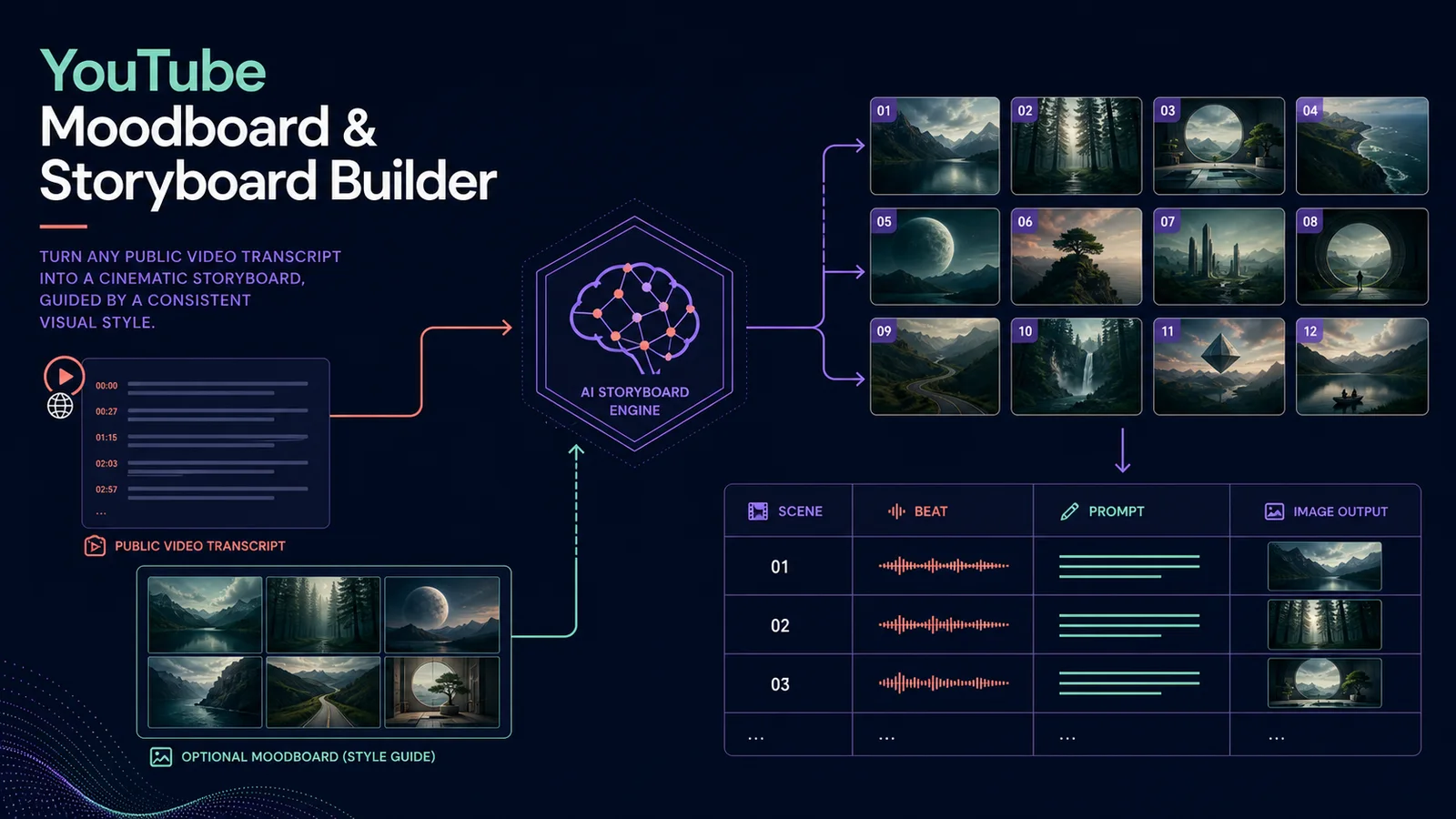
Turn a public YouTube transcript into a structured 4–24 scene storyboard with visual prompts, beats and optional fal.ai moodboard images. The 13-node workflow records every scene in Google Sheets so an editor can review the plan before production.
Workflow JSON included Setup steps included API requirements listed One-time purchase
YouTube transcript workflow converted into storyboard scenes, prompts and an optional visual moodboard
€39.95One-time purchase or included with annual, Ultimate + LTD
Free account required for purchase Or get every template for life from €149.95 →

Import readiness

What to verify before using this n8n template

# workflow file
✓ included — n8n workflow JSON attached to this template
# required accounts
✓ listed — see required APIs & services below
# setup instructions
✓ included — full steps below to estimate effort

Workflow JSON

The downloadable n8n workflow file is attached to this template.

Required accounts

Required APIs, credentials and services are listed on this page.

Setup effort

Setup instructions are included below so you can estimate implementation time before buying.

Workflow fit

Best when you want the same researched process to run consistently without rebuilding the node chain for every job.

Key features

  • 13 connected n8n nodes from input form to reviewed storyboard output
  • Fetches the available YouTube transcript through Apify
  • Builds 4–24 ordered scenes with narrative beats and image prompts
  • Uses an optional public moodboard URL as a visual style reference
  • Renders storyboard frames through fal.ai with a wait-and-retrieve loop
  • Writes scene numbers, beats, prompts and output URLs to Google Sheets

Setup instructions

1. Import the workflow JSON into n8n.

2. Replace YOUR_APIFY_TOKEN in Fetch YouTube transcript.

3. Add your OpenAI credential to Create storyboard.

4. Add a fal.ai HTTP header credential to Render storyboard image and Get rendered image. Confirm the model endpoint available in your account before the first run.

5. Create a Google Sheet for storyboard rows. Replace YOUR_GOOGLE_SHEET_ID in Save storyboard scenes and map its columns.

6. Publish the form and submit a public YouTube URL, 4 scenes and no moodboard URL for the first test.

7. Confirm transcript text, parsed scene count, render status and Google Sheets rows before trying a larger storyboard.

8. Add a public moodboard URL only when you have permission to use the reference. Review every generated frame before using it in production.

Perfect for

  • YouTube producers
  • Faceless-channel operators
  • Video editors preparing shot lists
  • Creative agencies turning references into production briefs

Requirements

  • Self-hosted or cloud n8n
  • Apify account and API token
  • OpenAI API credential
  • fal.ai account with an HTTP header credential
  • Google Sheets credential and a sheet for storyboard rows
  • A public YouTube video with usable captions

Account required

You need a free account to purchase this template. Registration only takes a minute.