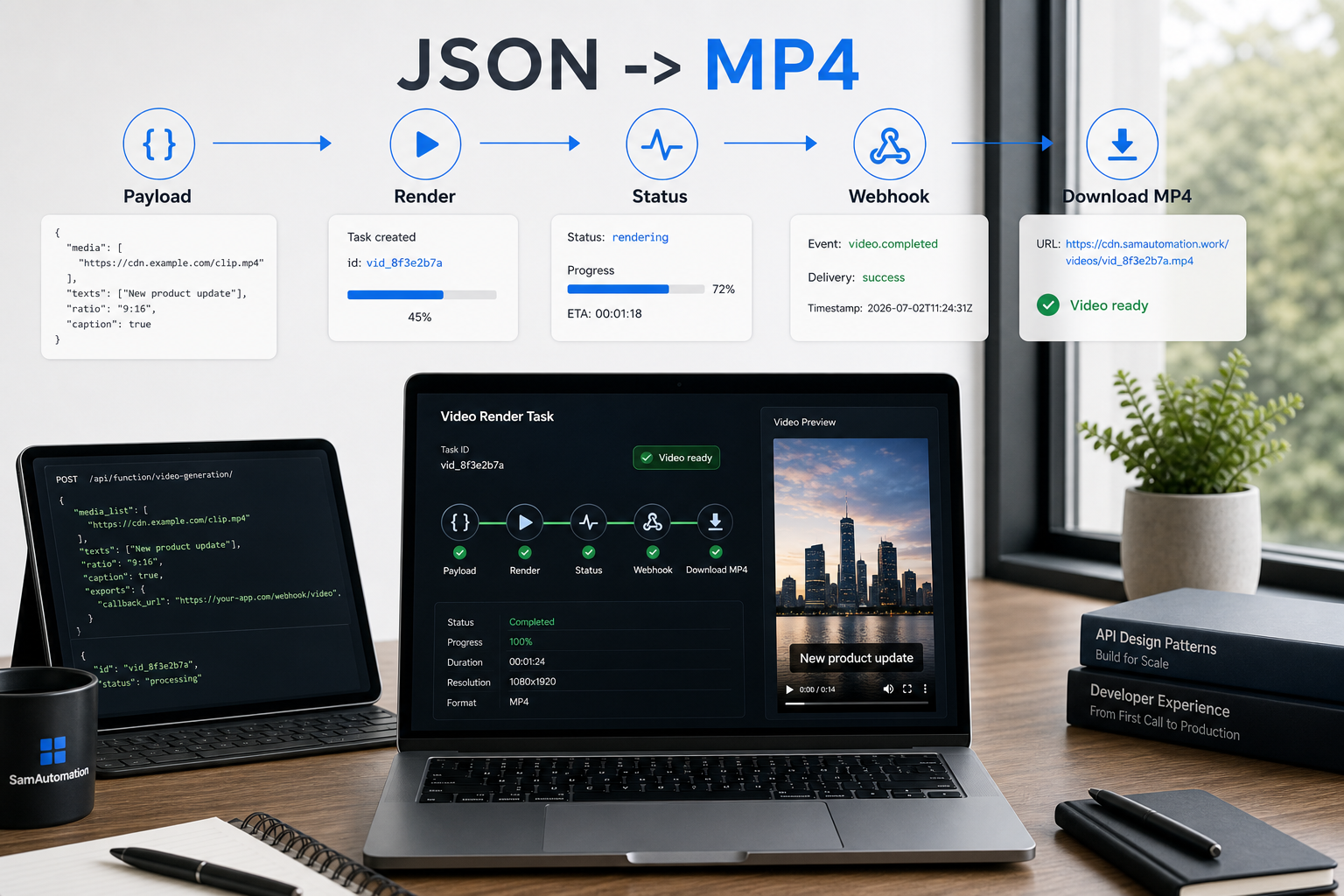
JSON describes the video; a renderer creates the file
A JSON file is not a video. It is text that can describe scenes, images, captions, audio, timing, transitions, and output settings. A renderer reads that data and creates an MP4, WebM, GIF, or another media file.
A basic JSON file example might contain {"scenes":[{"text":"Hello","duration":3}],"format":"mp4"}. JSON stands for JavaScript Object Notation. It is still widely used for APIs and automation, so JSON is not obsolete. JSON for beginners is usually manageable because the format only uses objects, arrays, keys, values, and a few strict punctuation rules.
To turn JSON into video, validate the JSON, map each field to a supported video element, send the job to a rendering engine, poll its status, and download the finished file. The same process answers how to turn JSON into MP4 and how to convert JSON code to a video.
Use the JSON-to-video workflow and schema examples to build a render request your chosen engine can actually process.
Choosing a JSON-to-video converter
The best JSON-to-video converter is the one that supports your required inputs and gives you a predictable output. Check its schema, timeline controls, caption support, media storage, callback options, error messages, and output formats before comparing headline prices.
| Option | Good fit | Main limitation |
| Hosted JSON-to-video API | Automated production without managing render servers | Usage limits and provider-specific schemas |
| Open-source renderer from GitHub | Custom logic and local control | You maintain rendering, queues, codecs, and storage |
| Browser-based JSON video editor | Testing a template by hand | Often less suitable for batch automation |
| Lottie JSON to video | Rendering vector animation data | Lottie JSON is an animation format, not a general video timeline |
A JSON video player or JSON video HTML page normally reads a manifest and plays referenced media. It does not make arbitrary JSON behave like an MP4. A JSON video download should therefore mean downloading the rendered media, not renaming the source file.
Start with a reusable JSON video template if your videos share the same layout but use different text, images, or audio.
Free APIs, testing limits, and pricing models
A free JSON-to-video API usually means a trial, limited credits, a restricted test environment, or self-hosted software. It rarely means unlimited rendering. Check whether the free tier allows downloads, removes watermarks, accepts external media, and permits commercial use.
JSON2Video pricing and similar API pricing may be charged per execution, operation, render minute, credit, storage period, or output type. Rates change, so confirm the current pricing page before designing your unit economics. A JSON2Video API key is normally created inside the provider account and must stay on your server, not in browser JavaScript or a public GitHub repository.
The same caution applies to a free video API for developers, a free video API for testing, a video editing API free tier, an API video generator, and a free text-to-video API. Video streaming APIs and VOD APIs solve a different job: they upload, process, store, secure, or deliver video on demand rather than generate a timeline from JSON.
Compare the available AI video API integration patterns before tying your JSON schema to one provider.
Sora storyboards and structured prompts
Fields such as n_frames, image_urls, and aspect_ratio can appear in community examples, wrappers, or exported storyboard data. Do not assume they form a universal Sora or Sora 2 Pro schema. Match every field against the documentation for the exact API, app, repository, or automation you use.
A safe storyboard object could store a scene ID, prompt, reference image URLs, frame or duration data, and an aspect ratio. The recommended aspect ratio depends on the destination: choose the output shape first, then keep reference images, storyboard frames, and the renderer consistent.
There is no reason to download an APK, unknown executable, or shared Sora API demo key just to inspect JSON. Treat offers for a free Sora 2 API key with care. Use the provider's official account and Sora API documentation where access is available, because authentication, model names, accepted fields, and limits can change.
You can use JSON prompting to keep scene instructions consistent. Veo 3 or another model may still require that object to be translated into the provider's accepted request format. For working patterns, see the structured text-to-video examples.
Images, models, and reference assets
Image generation models can supply storyboard frames, backgrounds, product shots, or character references before the video render starts. Flux is one model family used for image generation. The best AI image generator for realistic photos depends on prompt control, reference-image support, licensing, output consistency, and the API you can automate.
An AI image model download is different from an online AI image generator. A local model needs compatible weights, software, hardware, and a licence that permits your intended use. A free model or free generator may still restrict output size, queue priority, commercial use, or API access.
“Civic AI image generator” is not specific enough to identify one standard model or API. Confirm the exact product name and its official documentation before sending prompts or credentials. Keep generated image URLs accessible to the renderer for the full job, or upload the files to storage you control.
YouTube JSON integration and authentication
YouTube Data API v3 is the main public API for reading and managing supported YouTube resources such as videos, channels, playlists, and comments. You create credentials in Google Cloud. An API key can handle permitted public-data requests; OAuth authentication is required when a request acts for a user or changes account data.
The API uses quota. Access may be free within the assigned quota, but quotas, policies, and eligible methods can change. Read the current YouTube API v3 documentation instead of treating an old “YouTube API key free” tutorial as a permanent rule.
A YouTube JSON integration usually sends or receives metadata, IDs, status data, and upload settings. It does not download a YouTube video merely because a response is JSON. There is no general public product called the YouTube Studio API that mirrors every Studio feature; use the documented YouTube APIs and supported OAuth scopes.
The “YouTube 7 second rule” is usually creator advice about winning attention early, not a YouTube Data API rule. Test the opening against your own retention data rather than treating seven seconds as a platform requirement.
Unknown endpoints, downloads, and safe debugging
Paths such as api/v1/videos/2feg6qaem3a, api/v1/videos/we7kakwjow8, api/v2/video/683936.json, and api/v2/yourbroad/videos.json look like provider-specific endpoints or example identifiers. They are not standard JSON-to-video routes. Find the owning service before sending credentials or assuming the response contains a downloadable file.
The same applies to phrases such as “support json like video pvuv example.” If it came from an error, repository, or network request, inspect the surrounding code and response headers. A real download response may provide a signed media URL, job asset, or binary body. A status endpoint may return JSON only.
For a JSON-to-video GitHub project or JSON2Video alternative, check the licence, recent maintenance, supported codecs, queue handling, and whether examples still match the current release. Never commit API keys. A JSON2Video review is useful only when it tests the same render type, volume, and failure handling you need.
JSON can also describe audio jobs, but JSON to MP3 still needs an audio source or text-to-speech step plus an encoder. JSON itself contains instructions or data; it does not become playable media without processing.
Questions people ask
Can a JSON file be a video?
No. JSON is a text format that can describe a video timeline or reference media files. A renderer must turn those instructions into an MP4, WebM, GIF, or another playable format.
How can I convert JSON code to a video?
Use a renderer whose schema matches your JSON. Submit the validated payload, wait for the render job, then download the output URL or file returned by the service.
Is there a free JSON-to-video API?
Some services offer trial credits, limited test tiers, or self-hosted code. Check watermarks, download rights, render limits, and commercial-use terms because free access and rates can change.
What does JSON2Video cost?
There is no single fixed price shared by every JSON-to-video service. Providers may charge per execution, operation, render minute, credit, storage period, or output type, and their rates change.
Can I create a video using JSON prompting?
Yes, if an application translates the JSON into supported scenes, prompts, assets, and render settings. The model itself may accept a different schema, so validate the payload against its current documentation.
Can I use JSON prompts in Veo 3?
You can store structured Veo prompts in JSON inside your own workflow. Your integration must then convert that structure into the exact request fields accepted by the current Veo interface or API.
What are n_frames, image_urls, and aspect_ratio in a Sora storyboard?
They are descriptive field names seen in some examples, wrappers, or exported data, not a guaranteed universal Sora schema. Check the exact repository or API documentation before using them in Python, JavaScript, or a production request.
Can I get a free Sora 2 API key?
Do not trust shared demo keys, APK downloads, or keys posted on GitHub or Reddit. Use the official provider account and current documentation for access, authentication, and limits.
Is YouTube's API free?
YouTube Data API v3 uses quota assigned through Google Cloud. Requests may be available without a direct per-request charge within that quota, but current limits, policies, and billing conditions should be checked in the official documentation.
Which API is used by YouTube integrations?
YouTube Data API v3 handles many video, channel, playlist, and comment operations. Uploading and account-level actions can also require OAuth and other documented YouTube API methods.
What is a VOD API?
A video-on-demand API manages tasks such as upload, encoding, storage, playback, access control, or delivery. It normally does not generate a complete video from a creative JSON timeline.
What can I convert a JSON file to?
JSON can be transformed into CSV, XML, database records, HTML, configuration objects, or media-job instructions. The possible output depends on the meaning of its fields and the software reading them.
Is JSON difficult to learn?
The basic syntax is small: objects, arrays, keys, strings, numbers, booleans, and null values. Most errors come from missing quotes, commas, or brackets, so a validator catches many beginner mistakes.
Can JSON be converted directly to MP3?
Not by simple file conversion. The JSON must point to audio, contain synthesis instructions, or provide text for speech generation, after which an audio tool can encode the result as MP3.